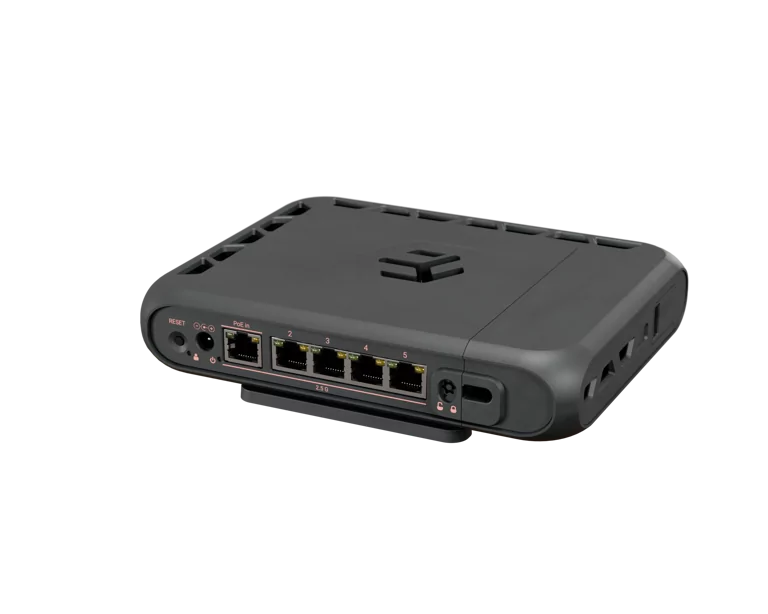
MikroTik Finally Joined the Wi-Fi 7 Party
It took them long enough. Eero shipped Wi-Fi 7 in 2024. TP-Link flooded the BestBuy aisle with Archer BE-everything in early 2025. UniFi gave us the U7 Pro and U7 Pro Max. And MikroTik — the brand that homelabbers and small-WISP operators actually trust to keep packets moving — has been quietly sitting on Wi-Fi 6E hardware while the rest of the industry pretended Multi-Link Operation was magic.
That ends this month. The hAP be3 Media (MA53UG+HbeH) is now listed for pre-order at $179, with first shipments scheduled for late April 2026. It's MikroTik's first Wi-Fi 7 router, and on paper it punches well above its price tag. I've been waiting for this one for about eighteen months, so let's break it down properly.
The Spec Sheet That Matters
Under the hood you get a Qualcomm IPQ-5322 — a quad-core ARM64 chip running at up to 1.5 GHz — paired with 2 GB of RAM and 512 MB of NAND. That's a meaningful jump over the hAP ax3 (which had 1 GB) and finally enough headroom to run a few RouterOS containers without praying.
For wired connectivity, you get five 2.5GbE ports. Not one 10G uplink and four gigabit dropouts — five honest 2.5G ports. One supports PoE-in (802.3af/at), so you can power the unit from an upstream switch. There's also USB-C, two USB-A 3.0 ports, and a microSD slot. The microSD plus container support is the part that actually matters: you can run a Pi-hole, a UniFi Network controller, or a small Tailscale exit node directly on the router without buying another box.
Wireless is where the announcement gets interesting:
- **2.4 GHz:** 574 Mbps, 2x2 MIMO - **5 GHz:** 1200 Mbps, 2x2 MIMO - **6 GHz:** 5764 Mbps, 2x2 MIMO, 320 MHz channels
MLO in TR-MLMR mode is supported — that's the meaningful Wi-Fi 7 mode where the AP can talk to a client across two bands simultaneously. The 2x2 chain count is honest. Don't confuse this with the BE19000-class units running 4x4 on 6 GHz. This is a single-AP home router, not a high-density office deployment radio. At $179, that's exactly correct.
Antenna gain is solid for an indoor unit: 4 dBi on 2.4 GHz, 7.5 dBi on 5 GHz, 8 dBi on 6 GHz. All integrated.
The Numbers That Will Decide if You Buy It
MikroTik published actual throughput figures, which is more than I can say for most of the consumer brands:
- **Fast-path routing:** 4787 Mbps at 1518-byte packets - **IPsec (AES-128-CBC + SHA1, single tunnel):** 818.7 Mbps at 1400-byte packets
The routing number is fine — you'll saturate every 2.5G port with NAT enabled and have headroom. The IPsec number is what I really care about. 818 Mbps on a single tunnel means this thing can be a legitimate site-to-site VPN endpoint for a small business or a remote homelab. WireGuard performance hasn't been published yet, but historically RouterOS WireGuard runs faster than IPsec on the same silicon, so figure 1+ Gbps when that data drops.
Max power draw is 29W with everything attached, 20W without. Passive cooling. Operating range -30°C to +50°C. MTBF around 200,000 hours at 25°C. This is the kind of spec sheet you put in a closet and forget about for five years.
The Thread Radio Is the Real Story
Everyone is going to focus on Wi-Fi 7. They're missing the point. The hAP be3 Media has a built-in Thread radio and Bluetooth 5.4 — and combined with full RouterOS container support, that means you can run a local Matter-over-Thread border router on the same device that does your routing.
No Apple Home Hub. No Google Nest Hub. No SmartThings dongle phoning home to Samsung. Your smart home stays on your LAN, segmented to your IoT VLAN, with your firewall rules controlling what does and doesn't get to call out.
If you've ever tried to run Home Assistant on a Pi, drop a Sonoff Zigbee stick into a USB port, and then convince Apple HomeKit to talk to it through five layers of bridge software, you understand why this is a big deal. Native Thread + Matter on the router itself, with proper VLAN tagging and firewall control, is exactly the architecture I've been begging for.
The Competitive Picture
At $179, this is the cheapest serious Wi-Fi 7 router with a real management plane behind it. Let's look at the alternatives:
The TP-Link Archer BE9700 runs about $200-220 and gives you tri-band Wi-Fi 7 with a 10G port, but you're stuck with TP-Link's web UI and no scripting, no containers, no real firewall granularity beyond port forwards.
The UniFi U7 Pro costs $189 but it's an AP only — no router, no switch ports, no NAT. You're buying it to plug into a Dream Machine or USG, which doubles your cost minimum.
The ASUS RT-BE96U is $599. Different product class entirely.
MikroTik's pitch is simple: pay $179, get a router, switch, AP, VPN concentrator, container host, and Thread border router in one passively-cooled box that doesn't phone home. The trade-off is RouterOS, which has the steepest learning curve of any consumer-class network OS. If `set [find name=ether1] disabled=no` makes sense to you, you're going to love this thing. If it doesn't, buy the TP-Link.
What I'd Actually Use It For
In my own setup I'd put this at a remote site — a parent's house, a vacation cabin, a colo cage where I need a small POP. Five 2.5G ports gives me real switching capacity, the IPsec or WireGuard tunnel back to my main site is plenty fast for backups and management, and the Wi-Fi 7 6 GHz band gives me a clean spectrum for whatever fancy laptop the user shows up with.
For a primary home network I'd still pair this with a separate access point on a different floor, because 2x2 chains and integrated antennas only cover so much square footage. But as the brain of a small site? It's pretty much perfect.
The Catch
RouterOS v7 has been the fly in the ointment for MikroTik for three years. It got better in 2025 — wireless package fragmentation got cleaned up, the new wifi-qcom driver stabilized, and CAPsMAN finally feels like a finished product. But if you're coming from RouterOS v6, expect a configuration migration. WiFi 7 specifically requires the wifi-qcom-be package, which is v7-only.
The other catch is that 2x2 ceiling. If you have a household full of Wi-Fi 7 phones and a 4x4 Wi-Fi 7 laptop, the laptop is going to be bottlenecked by the AP, not the other way around. For a single-AP deployment serving a typical home, that's fine. For dense Wi-Fi 7 deployments, look at the upcoming MikroTik 4x4 units instead — those are still on the roadmap.
The Verdict
$179 for a Wi-Fi 7 router with five 2.5G ports, a real OS, container support, native Matter/Thread, and published throughput numbers I can verify is exactly what the homelab segment has been waiting for. It's not the fastest Wi-Fi 7 device on the market and it's not trying to be. It's the most flexible Wi-Fi 7 device in its price class, and that flexibility is going to matter a lot more in five years than peak 6 GHz throughput will.
Pre-order is live now. Shipments start late April. I've already got mine on order — I'll do a real-world coverage test and an IPsec/WireGuard shootout once it lands.
Loading comments...